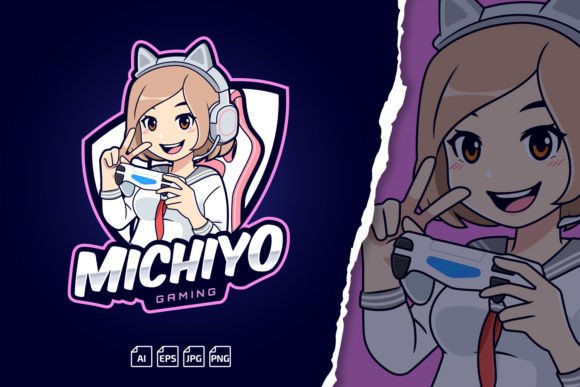
Giving Your Channel a Friendly Face with a Kawaii Streamer Gaming Girl Logo
Scroll through Twitch or Kick for five minutes and you'll notice a pattern. The channels that stick in your memory usually have one thing in common: a visual identity that feels intentional and personal. Not necessarily flashy, not always complex, but something that tells you who this creator is before they even speak. A Kawaii Streamer Gaming Girl Logo fits into that space perfectly. It's approachable, cheerful, and carries the kind of warmth that makes viewers want to hang around longer than they planned.
But this isn't just about picking something cute and calling it done. The template format matters because it gives you room to adapt without starting from scratch. When you buy or download a Kawaii Streamer Gaming Girl Logo Template, you're getting a foundation you can reshape around your channel name, your color palette, and the personality you're building with every stream. That flexibility turns a static image into something that grows with you.
Where This Kind of Logo Shows Up in Real Streaming Life
Most people think of a logo as the little circle in the corner of a stream layout. That's one use, sure. But a well-made kawaii gaming girl logo stretches across a lot more real estate than people realize.
Think about the banner at the top of your Twitch or YouTube page. That's often the first thing someone sees when they land on your channel after a raid or a search. A blank or cluttered banner loses attention instantly. A clean, scaled version of your kawaii logo sitting comfortably in that banner space signals professionalism without screaming for attention. It tells the viewer they're in the right place.
Then there are emotes. Sub emotes, follower emotes, bit emotes, Kick emotes — whatever platform you prefer, those tiny images carry enormous weight. Viewers use them to communicate in your chat, spread them across other channels, and basically become walking advertisements for your brand. A Kawaii Streamer Gaming Girl Logo designed with emotes in mind gives you a cohesive look across all those tiny squares. The eyes, the hair, the signature accessories from your main logo can shrink down beautifully when the source files are built with scaling in mind.
Off-stream applications matter too. Merch, if you ever go that route, needs a logo that prints cleanly on shirts, mugs, and stickers. Social media headers, Discord server icons, YouTube thumbnails — each of these requires different dimensions and sometimes different levels of detail. Having editable vector files behind your kawaii gaming girl logo means you're not pixelating your face off trying to fit a 500px PNG into a banner that needs to be six times that width.
Why Creators Pick a Kawaii Aesthetic for Gaming Content
The word "kawaii" gets thrown around a lot, but in the context of streaming, it serves a specific purpose. Gaming content can get intense. Competitive matches, horror playthroughs, rage moments, victory highs — the emotional range is wide. A kawaii-style logo acts as a gentle counterbalance. It says, "Yes, we take the game seriously, but this is still a place where you can relax."
For creators who build community around comfort, inclusivity, and positive vibes, the aesthetic matches the message. A cute gaming girl character with oversized headphones, pastel hair, and a playful expression tells a story that a sharp, aggressive esports crest doesn't. Neither is better in absolute terms. They serve different audiences and different channel cultures. The key is knowing which one reflects the space you're actually creating for your viewers.
Small streamers especially benefit from this approach. When you're competing against thousands of channels, a visually warm and recognizable avatar helps people remember you after a single raid or a brief appearance in their recommended feed. The kawaii style tends to be distinct enough that it cuts through the visual noise without requiring an enormous art budget.
Scaling a Logo Across Every Platform Without Losing Quality
One of the quiet frustrations of running a channel is discovering that the logo you commissioned or downloaded looks great at 300x300 but falls apart at 1500x500. Blurry edges, muddy details, weird artifacts — these signal amateur hour to anyone scrolling past. Viewers may not consciously think "bad logo," but they feel it. Trust dips slightly. Perception shifts.
That's where the vector foundation of a Kawaii Streamer Gaming Girl Logo Template becomes practical rather than just a technical spec. Vector files scale infinitely. You can stretch that character illustration across a full-size Twitch banner, shrink it for a mobile-friendly profile icon, and place it on a YouTube end screen without ever seeing a jagged edge. The preview PNGs give you a quick starting point. The AI and EPS files give you real control.
Layered files add another dimension. Maybe you want to adjust the hair color to match a new brand palette. Maybe the original design has pink accents but your channel vibes better with teal. With layered templates, you isolate those elements and make changes without affecting the rest of the design. That kind of editability turns a one-time purchase into a long-term asset.
Fonts, Text, and Making the Logo Yours
Generic text can kill an otherwise charming logo. When the character art is expressive and the typography looks like a placeholder, everything falls flat. The templates that include editable text and commercial-use fonts solve this directly. You type in your channel name, adjust the size and spacing, and suddenly the design wraps around your identity instead of someone else's placeholder text.
The font link in the readme file removes the guesswork. Instead of hunting around for "what font is this" or accidentally using something that requires a pricy commercial license, you follow the provided instructions and install exactly what the designer used. For streamers who eventually monetize, the free commercial font license means you won't get an unexpected legal headache down the road when your channel grows and you're running ads, selling merch, or taking sponsorships.
Renaming and retexting seems like a small detail until you're actually doing it. The tutorial video included with many of these templates walks through the process step by step. For someone who knows their way around Adobe Illustrator, it's a five-minute task. For someone opening Illustrator for the first time, the guidance prevents the frustration that often leads to abandoning the project altogether.
Practical Scenarios for Different Types of Users
A solo streamer launching their first channel needs something they can implement within a weekend. They don't have a design team. They may not even have design experience. Downloading the PNG preview gives them an immediate logo for their profile and starting stream overlays. As they get comfortable, they can explore the editable files and tweak details to match their evolving brand. The growth path is built into the product.
A gaming team or esports squad might use the same template differently. Each member could adapt a version of the kawaii gaming girl logo with personalized colors, gamertags, or subtle variations that signal individuality while keeping the team identity cohesive. When viewers see the team's social posts, stream thumbnails, or tournament overlays, the visual thread runs through everything without feeling cookie-cutter.
A content creator who streams on multiple platforms — say, Twitch for gaming, YouTube for edited content, and TikTok for clips — faces the challenge of maintaining visual consistency across completely different aspect ratios and audience expectations. A single logo designed with vector scalability means the Twitch panel version, the YouTube banner version, and the TikTok profile version all feel connected. One identity, many canvases.
For educators or coaches who use streaming as a teaching tool, the kawaii aesthetic softens the instructional tone. Someone teaching game mechanics, coding, or digital art on stream benefits from an approachable brand that encourages questions and interaction. A harsh, overly corporate logo works against that goal. A cute, friendly gaming girl character invites participation.
Things to Consider Before Choosing a Logo Template
Not every kawaii logo will fit every content niche within gaming. A horror-focused channel might find the contrast interesting — cute logo, scary content — but that's a deliberate creative choice, not an automatic fit. Consider whether the aesthetic serves your content or works against it. The logo should support the experience you're creating, not distract from it or send mixed signals to potential viewers.
Check what software you actually have access to. The AI files require Adobe Illustrator CC, while the EPS format opens in older versions and some alternative vector programs. If you don't have any vector editing software, the editable text and layered adjustments won't be accessible to you beyond the PNG preview. Be honest about your technical setup before you invest. The PNG preview alone may serve your immediate needs, but the long-term value lives in those editable source files.
Color choices matter more than people think. A pastel-heavy design looks dreamy on a light background but can wash out on certain stream overlay setups or dark-mode platforms. Test how the logo reads against different backgrounds — light, dark, busy, minimal. The transparent PNG format makes this easy since you can drop the logo onto any background without a bounding box getting in the way.
Also worth noting: installation instructions and readme files exist for a reason. Skipping them leads to avoidable problems. The font installation step in particular trips up users who jump straight into editing and wonder why the text looks wrong. Following the provided guide in order saves time and frustration.
Why This Works for Small Businesses and Freelancers Too
Streaming isn't the only use case. Freelancers who offer gaming-related services — coaching, thumbnail design, overlay creation, channel management — can use a kawaii gaming girl logo to brand their own business. It signals industry familiarity and a playful professionalism that resonates with gamer clients. An overly corporate freelance brand often feels out of touch in gaming circles. A cute, well-designed logo builds instant rapport.
Small businesses selling gaming accessories, handmade controller mods, custom keycaps, or digital art commissions find the same benefit. The logo sits on Etsy storefronts, Instagram product posts, and packaging inserts. The commercial-use font license covers those applications without additional fees. The transparent PNG works for watermarks, price tags, and promotional graphics.
Bloggers and publishers covering gaming news, reviews, or culture can adapt the logo into a site header or newsletter banner. It adds personality to text-heavy pages without overwhelming the content. The editability means the logo can be simplified or recolored to fit website themes as they evolve over time.
Getting Comfortable with the Editing Process
Many people buying design templates feel intimidated by the editing software. That hesitation is normal. But logos with included tutorial videos lower that barrier significantly. Watching someone walk through the exact file you're working with — not a generic Illustrator tutorial, but one specific to the product in your hands — makes the steps concrete. You watch them change the text, swap a color, export for web. Then you do it yourself. The next time, it's faster.
Contacting the designer for help is also an underused resource. Many template creators list their contact info precisely because they anticipate questions. If a layer isn't behaving the way the tutorial showed, or if you need a format variation not included in the download, reaching out often resolves the issue quickly. This support loop transforms what might be a frustrating dead-end into a solvable problem with a real person behind it.
The logo becomes yours through use, not just through purchase. Every time you tweak a color, resize for a new platform, or drop it into a thumbnail, you're building familiarity. Eventually the editing process feels natural, and the logo starts carrying the weight of your channel's history. Viewers associate it with good streams, funny moments, and the community they keep coming back to.